Automating Observability
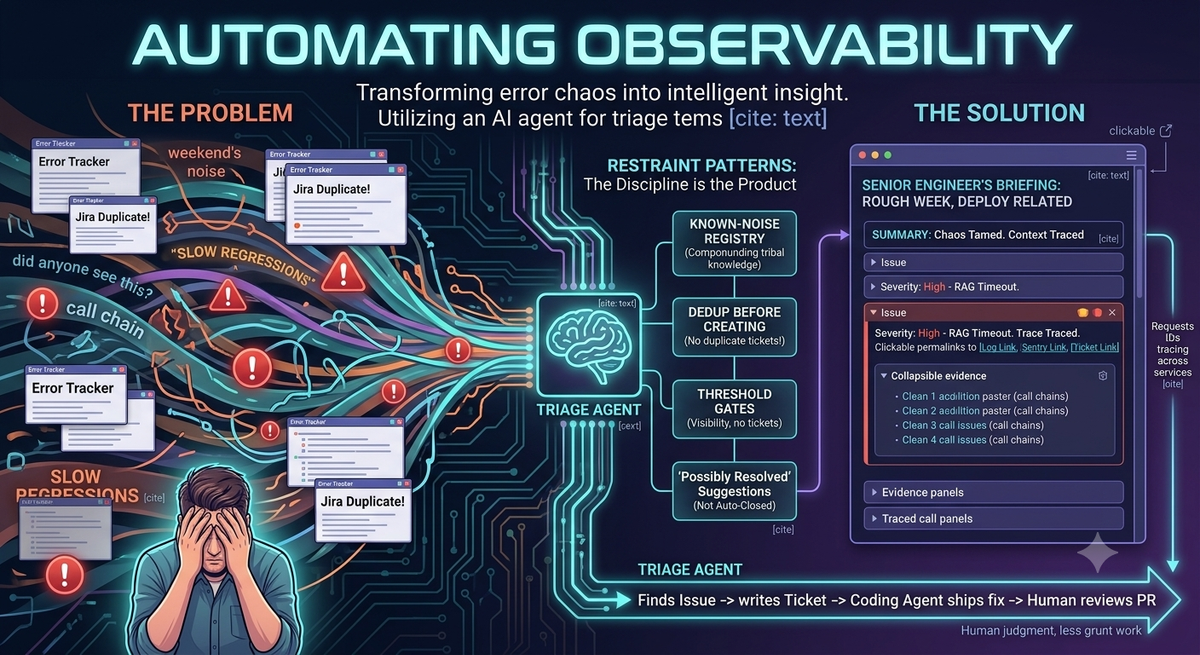
Every Monday, someone on your team opens the error tracker, scrolls through the weekend’s noise, and asks the channel: “did anyone see this?” Someone else checks Jira for duplicates. By Tuesday, half the alerts are dismissed, a third spawned duplicate tickets, and the regression that actually matters is buried in the middle.
What if a briefing was already waiting? Noise filtered. Call chains traced. Duplicates merged. One click from every relevant Sentry permalink, ticket, and log.
That’s what this post is about: not another dashboard, not another alert. Automating triage: the work of deciding what an alert actually means.
The real problem isn’t alerts
Every observability platform is great at telling you something happened. None of them tell you what to do about it. Going from “errors occurred” to “this matters, here’s why, here’s the next step” requires reading the stack trace, checking whether it’s user-facing, asking what changed, tracing across services, and cross-referencing the ticket tracker. That’s a senior engineer’s hour. Every week.
So teams pick one of two losing strategies: page everyone (and train the team to ignore the channel), or only react when something’s on fire (and let slow regressions accumulate in the dark).
An AI agent changes the calculus because, for the first time, the triage itself can be automated. Not just the alerting.
What the agent actually does
A weekly job runs against the team’s error sources. It diffs this week against last week, classifies what it finds (user-facing vs. infra noise, new vs. re-emerging, deploy-correlated vs. background), and traces call chains across services using request IDs. Before creating any tickets, it checks for existing ones.
The output reads like a senior engineer’s briefing: a few sentences at the top setting the tone (“rough week, deploy at 2pm Tuesday looks related”), then per-issue sections with a severity score, a plain-English explanation, collapsible evidence, and one concrete next step. Everything is a clickable link.
That’s what the agent does. What matters more is what it doesn’t do.
The discipline is the product
The single most important feature (and the one that took longest to get right) is knowing when not to act. An AI workflow that flags everything is just a louder alert channel. Teams learn to ignore it for the exact same reasons they ignore alerts.
Five restraint patterns make this work, all backed by persistent artifacts rather than runtime guesswork:
Known-noise registry. A markdown file the agent reads on every run. Patterns confirmed as infra noise get auto-dismissed, with an auditable reference to the ticket that originally confirmed them as noise.
The registry compounds. Every “Won’t Do” closure feeds the underlying pattern back in. The team’s tribal knowledge, normally buried in Slack threads, becomes durable. The agent gets smarter every week without retraining a model. It’s just markdown that grows.
Dedup before creating. A re-emerging issue gets a comment on the original ticket, not a duplicate. This one change is responsible for most of the perceived quality of the briefing.
Threshold gates. Low-impact issues appear for visibility but don’t generate tickets. The team can see them; they’re not forced to act.
“Possibly resolved,” not auto-closed. When a pattern goes silent, the agent comments on the ticket suggesting a verify. It doesn’t close it. Closing is a human call.
Together, these restraints are the actual product. The agent is just the delivery mechanism.
What actually surprised us
The registry is the lever, not the agent. Once enough noise patterns exist and enough tickets are in the tracker to dedup against, quality jumps. New team deployments start weak: seeding a few obvious noise patterns at setup is worth the ten minutes.
Narrative beats metrics every time. The first version was a table of counts. Nobody read it. Two sentences of plain English at the top, like “quiet week” or “rough week, here’s why,” and engineers actually engage.
What’s next
The agent today stops at the ticket. The obvious next step: keep going. Search the codebase for the file and function where the failure originates. Propose missing instrumentation where traces go dark. Write the ticket in a form structured enough that a coding agent can pick it up and ship a fix without a human handoff.
That shift changes what a ticket even is. Tickets written for humans are short and vague; tickets written for agents need explicit acceptance criteria, named files, the exact reproduction path. The composition becomes: triage agent finds the issue → writes the ticket → coding agent ships the fix → human reviews the PR.
Humans still own the judgment calls. They just own less of the grunt work.