Dynamic Prototyping: How Claude Artifacts Killed the Requirements Doc
For the past year, I've been building visual prototypes as a product manager without a design background. What I've learned is that the tools have recently shifted in a way that fundamentally changes how we can approach this work—and it's a complete game changer.
Let me explain what I mean.
The Old Way: Waterfall Prototyping
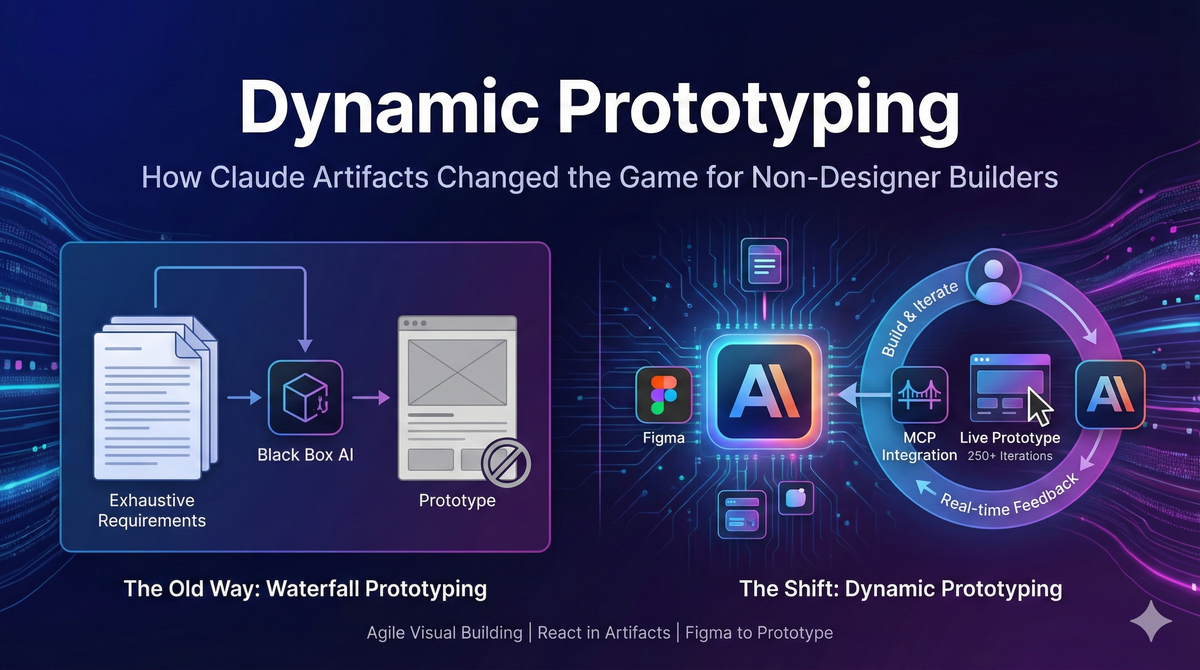
Until recently, if you wanted to build a visual prototype without being a designer, you had one viable path: write exhaustive requirements first, then pray.
The process looked something like this. You'd spend hours working with an AI assistant to build out comprehensive requirements documents. You had to nail down nearly all the functionality upfront—every screen, every interaction, every edge case. You'd go back and forth finding gaps and weaknesses in your requirements, then rely on the AI to draft an entire design schema jammed into a massive document the size of small novel. It was a black box, but it helped create and shape the entire context for visualization tools.
If you did this with care and discipline, you could at best get maybe 80% of the way to what you envisioned. But sometimes the prototype would come back significantly different from what you had imagined, and you'd have to adjust and start over. The visualizing tools that powered this ecosystem—Loveable was the early favorite, then Figma Make with its design library integration—all shared the same fundamental limitation. Once the prototype was built, making meaningful changes was painful. The tools just struggled with iteration.
I call this Waterfall Prototyping because, just like waterfall software projects, the premium was on defining everything upfront before you have had the opportunity to iterate and learn. Get the requirements wrong, and you'd feel it later.
The Shift: Dynamic Prototyping
Recently, Claude introduced something that genuinely changed how I work: the ability to build visual React prototypes directly in Artifacts, combined with an MCP integration that lets you pull Figma designs straight into the conversation.
This might sound incremental. It isn't.
Here's what's different. You can now start with a simple requirements document—just the high-level functionality and some generic design assumptions—and then build the experience through conversation. You're not trying to predict every interaction before you've touched the prototype. You're designing the UX flow as you build, iterating in real time, playing with the prototype, and then iterating again.
The Figma MCP integration is the key unlock. You copy links to elements in your design library, and Claude pulls them directly into the prototype. Your brand, your components, your visual language—all there from the start.
I recently built a prototype that went through 250 iterations. Not 250 back-to-the-drawing-board moments, but 250 refinements, adjustments, and explorations. Some were major pivots, many were small tweaks. This is the kind of creative exploration that Waterfall Prototyping simply doesn't allow.
This is what I'm calling Dynamic Prototyping. It's the Agile version of building visual experiences. You start with a loose idea and build outward, letting the prototype itself inform your decisions rather than trying to imagine everything in advance. When you identify a problem in your concept, you simply stop and plan with Claude right in the same thread and then resume iterating.
The Honest Limitations
Dynamic Prototyping isn't without friction. Here's what I've learned about working around the current constraints.
Conversation limits are real. With multiple iterations on a prototype, you'll hit Claude's context limits faster than you expect. The solution is to save your TSX file and start a fresh artifact, having Claude rebuild from your saved code. It takes a minute, but it resets the conversation until you hit your next context limit.
Complexity creates challenges. Sonnet 4.5 handles simple prototypes and smaller iterative changes beautifully, in fact, far better than I expected. But once your prototype gets large, it can start to struggle. When this happens, download your TSX file and start a new artifact in an Opus thread. The jump in capability is noticeable.
There's a hard ceiling. At some point, sufficiently complex prototypes will exceed conversation limits just in the rebuilding step. One thing that helps is to have Opus review your React code and optimize it for size and function before you hit that wall. It can componentize sections and streamline your code with a simple prompt. It buys you more runway, but its not infinite.
What's Next
The limitations on artifact thread length make large, advanced prototyping genuinely difficult right now. The horizon I'm exploring next is building these prototypes directly in a React application using Claude Code paired with Figma's dev mode. This approach could work around thread size limits entirely, provide more robust code shaping tools, and potentially create publishable prototypes rather than just internal explorations.
How long will it be before small pods of product, design, and engineering are sitting in the same room all day, IDE's open, iterating, exploring, and building together in real time? I suspect that future is closer than most people think.